An account in Spotler Mail+ always has exactly one owner. You become the owner when the current owner transfers that role to you. The current owner does this by changing their own role to Marketer via Settings > Account & Billing > Users, and then selecting you as the new owner.
Only the current owner can transfer the owner role, and only to a user who already exists in the account. The transfer always starts with the role of the current owner, not with the role of the new owner. So it does not work to make another user the owner yourself by changing that user's role.
How do you transfer the owner role?
The current owner of the Spotler Mail+ account performs these steps. Does the new owner not exist as a user yet? Create a new user first.
- Go to Settings > Account & Billing > Users.
-
Find your own user in the list, open the dropdown menu and click Change role.
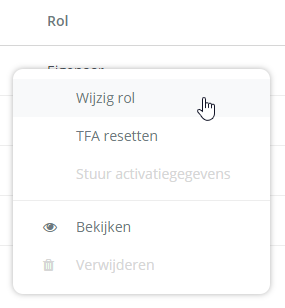
- Select the Marketer role in the pop-up.
- Then select the user you want to transfer the owner role to and complete the change.
The selected user is then the new owner of the account, and you have the Marketer role. Want to know what each role can do? Read Which user roles are there in Spotler Mail+.
Is the owner no longer with your organisation?
Can the current owner no longer transfer the role, for example because they no longer work at your organisation? Then contact Spotler Support. Support will help you transfer the owner role to another user.